Halloween Costume ideas 2015
dzerotech

--------------------------------------------------

Latest Post


Android App Cracking Tutorial by AleX

You have purchased an application on Market official Google Play and you want to install on multiple terminals
without wanting to buy back?
Want to share it with friends and family?
Let's see how
For this tutorial I used a Samsung Galaxy S2 with Android 2.3.4 Gingerbread ,
of ' SDK Manager (Tool + Virtual Device) and a PC running Windows 7 (x64) .
Whether you work in a Linux there are no problems.
Requirements
A terminal based on Android 1.5 or higher ,
a PC running Windows or Linux .
First we install on our device a file manager , Astro will be fine.
On the PC, install the tool Anti-LVL (which I recommend to keep updated):
Windows -> Download
Linux -> Download
Let's look at what the guards and tool
LVL and Protections
About 3 years ago, Google has changed the protection system that developers can
implement in your applications to prevent unauthorized copying.
This is based on the control of ' LVL (License Validation Library).
If circumvent old enough to have a terminal with protection rights root
folder and remove applications from the app private ,
today around the control is even easier.
Let's see how the ' LVL
android app cracking one aleandroid
The application does a license check through the ' LVL and Google Play client ,
which handles the communication with the server in the Store .
This is the LicenseValidator Class and you can find once disassembled the APK.
LicenseValidator.smali constants
. Field private
static final ERROR_CONTACTING_SERVER: I = 0 × 101
. field private static final ERROR_INVALID_PACKAGE_NAME: I = 0 × 102
. field private static final ERROR_NON_MATCHING_UID: I = 0 × 103
. field private static final ERROR_NOT_MARKET_MANAGED: I = 0 × 3
. field private static final ERROR_OVER_QUOTA: I = 0 × 5
. field private static final ERROR_SERVER_FAILURE: I = 0 × 4
. field private static final LICENSED: I = 0 × 0
. field private static final LICENSED_OLD_KEY: I = 0 × 2
. private static field final NOT_LICENSED: I = 0 × 1

LicenseValidator.smali verify
. Sparse-switch
0 × 0 ->: sswitch_d3
0 × 1 ->: sswitch_de
0 × 2 ->: sswitch_d3
0 × 3 ->: sswitch_11d
0 × 4 ->: sswitch_f3
0 × 5 ->: sswitch_101
0 × 101 - >: sswitch_e5
0 × 102 ->: sswitch_10f
0 × 103 ->: sswitch_116
. sparse-end switch

0 × 0 and 0 × 3 values ​​are both positive and when the application will control
the license will recognize as genuine .
The important part is this:
0 × 1 or NOT_LICENSED
In an application without a license,
changing 0 × 1 ->: sswitch_de in 0 × 1 ->: sswitch_d3
the library will show the application
that the license is valid .
Finally, just reassemble everything.
If any of you chew a little 'programming,
has already realized that automate the process
by means of a script is not that difficult.
It runs the tool Anti-LVL ,
that with a single command performs the whole procedure,
ie, an oversimplification:
disassembles, edit the file LicenseValidator and reassembled.
Crack an application
We start Astro File Manager ,
press Menu -> Tools -> Application Manager
android app cracked 2 aleandroid
Select the application you want to crack (Shazam Encore in my example),
press Backup
android app cracking 3 aleandroid
Will be used to dump the application folder: .. \ backups \ apps then We connect the device to the PC, and move the application on the desktop.
Unpack the file AntiLVL-1.4.0-win downloaded previously,
and put the application in the folder.
android app cracking 4 aleandroid
To see the full image click here .
We initiate the command prompt in Windows ,
and posizionamoci inside the folder AntiLVL-1.4.0-win .
If we have the files on the Desktop proceed as follows:
android app cracking 5 aleandroid
There are several commands, see the main one, that we are interested in:
java-jar antilvl.jar applicazione.apk
The application that we want to crack in this example is called com.shazam.encore.android-1.apk , in the command prompt, simply write:

java-jar antilvl.jar com.shazam.encore.android-1.apk
Then press Enter to execute the command.
android app cracking 5 aleandroid
To see the full image click here .
In a few seconds the tool will create a modified version of the original
that will also work on other terminals.
Since the original digital signature is not present
(this is because the application has been disassembled and riasssemblata),
we will be unable to perform updates from the Market Journal.
I remind you that an application
after purchase can be returned only once,
riacquistandola will no longer appear on the button reimbursement .
also I want to clarify that the procedure does not need to turn
a version free version pro ,
but only and exclusively to remove the protection LVL .
If we have a single terminal and want to verify the correct application
of the patch on an application of our knowledge, previously purchased on the official Market,
can download the ' Android SDK Manager that includes
several tools and a Virtual Device ,
useful for testing, simulating terminals with different versions of Android.
Lucky Patcher
There is another tool, bootable directly from the device,
very good and frequently updated,
I'm talking about Lucky Patcher .
The only requirement for use: root privileges .
It's really simple, let's see how to do ..
We download and install Lucky Patcher ,
we start it,
select the application you are interested in,
and click on Create APK changed .
android app cracking 7 aleandroid
This will create a modified version of the original in the folder .. \ LuckyPatcher \ Modified will also work on other terminals.
Lucky Patcher has other useful features,
such as ad blockers: Rimuvi Ads by Google!
Note
There is a growing number of applications with additional protection
submitted by the developers themselves (and not Google),
such as the control of the manipulation of fle APK ,
or a review of the additional license, Prepaid Card , Shark Dash , Widget Locker , SPB Shell , are just some of the applications in their latest versions do not work if you do not regularly purchased. In these cases, these methods are ineffective.

App Testing Guide
I attach a file for those who want to try using this guide,
inside you will find an application in two variants,
with protection LVL present and removed.
If you have any questions or you need help please do not hesitate to ask.
Have fun!
Notes
if you liked this article, please share and dont forget to Attach my link/this link ok v (^ _ ^)
thank you for your cooperation


for discussion about banned/cannot acces playstore etc go here
This app is the greatest app I've ever found, the usefulness of this application is to purchase items / gold or whatever is in the game or application to refer to playstore / android market.

(22/januari/2013)
work:angry birds, My horse, subway surfer, cut the rope, lets golf 3,dead tigger,jaws revenge,sushichop,sky gamblers, agent dash, fifa manager 2013, sexy girl, pretty pet sallon
ga work:temple run, zynga poker, undead slayer, hanging word, zenonia5

requirements:
-rooted
- conected to internet


notes:
technically it works like lucky patcher, 
not all applications can purchase with this application
installed version of the application must be the same as the version in playstore / android market
BACKUP YOUR GMAIL ACCOUNT!!!OR USE ANOTHER GMAIL FOR SAFETY.
DWYOR


tested by me:
zenonia 5, agent dash, fifa manager 2013, sexy girl, pretty pet sallon (work)
undead slayer, hanging word (not work)

Screenshot:


step:
1. instal application in internal memory
2. open application (if any update, please update and replace)
3. after open application, wait until the list application is show up.
4. choose the application what you want, and app will be open
5. good luck..!!!

Download
ffreedom.apk
(via dropbox)

mirror
(via sharebeast)
FOR ALTERNATIF, IF the APP not work you can try THIS APP


Notes
if you liked this article, please share and dont forget to Attach my link/this link ok v (^ _ ^)
thank you for your cooperation


this is blackmart for downloading paid aplication on market, this is update version so more smooth, stable and no crash anymore.


password:
dzero-tech.blogspot.com

download :
BLACKMART (mediafire)

alternatif link :
blackmart alternatif (dropbox)

#if your download file format is .zip please rename or use alternatif link
##if any update download, please update


Notes
if you liked this article, please share and dont forget to Attach my link/this link ok v (^ _ ^)
thank you for your cooperation


#copas mode

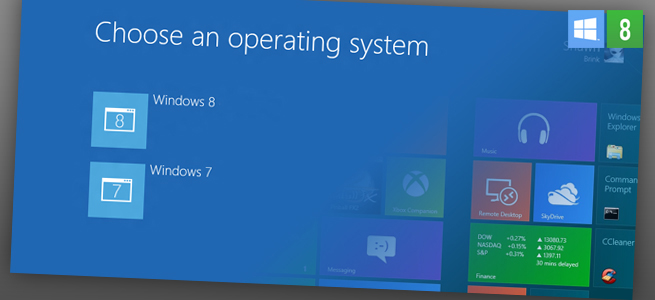
How to Dual Boot Windows 7 & 8

The thought of diving headlong into Microsoft's radically new Windows 8 operating system is a little scary to many computer owners. For those who are cautious, never fear: you can have the best of both worlds.


Windows 8 has gotten lots of buzz, and plenty of criticism, for its attempt to shake up your PC’s operating system. With so many big changes, you may want to keep your old Windows 7 OS on your machine, just so you have something familiar to ease the transition. Fortunately, you can work a little hard drive wizardry to make space for both the old and the new. Here’s how you can dual boot Windows 8 on a computer that already runs Windows 7.

Step 1: Back up your current system

This is always a good practice when you are tweaking an operating system. The risk of losing data is usually pretty low, but you don’t want files to disappear the one and only time you didn’t back up. Make sure you save a copy of your entire hard drive in addition to your regular backups. (You are backing up your files, right?)

Step 2: Create a new partition on your hard drive


You’ll need to set aside a separate chunk of your hard drive to house the new OS and everything you’ll run on it. Windows 8 on its own will take about 20GB of space, but you’ll also need room for all your programs and files, so you may want to allot as much space as you can take from your existing hard drive.
From the Start menu, right-click on the “Computer” option. Select “Manage” from the drop-down menu, then double-click on “Disk Management.”
The top of the Disk Management window displays a list of any existing partitions in your hard drive. Right-click on the entry for your main hard drive, which is C: for most machines, and select “Shrink volume.” Minimize the hard drive until you have the desired amount of free space. Once you have made the room for Windows 8, click the empty block and select “New Simple Volume.” This will launch a wizard to walk you through the final steps.
You won’t have to change anything until you reach the “Format Partition” window. The settings you will need for formatting are NTFS for File System and the default for Allocation Unit Size. Be sure to give the new partition a name under “Volume label.” Titling it “Windows 8″ will ensure that you can find it in the next step. After you’ve named the new space in the hard drive, click “Next” and your computer will complete the formatting.

Step 3: Obtain your copy of Windows 8

Depending on how you want to purchase the new OS, you can install it either by DVD or by USB drive. If you purchase a copy in your friendly local computer store, you’ll be using the DVD and DVD drive approach in the next step. If you prefer to download it directly from Microsoft, put the files on a large thumb drive and use the USB approach in the next step.

Step 4: Install Windows 8 in the new partition


This is the most complicated step. Depending on your computer’s settings, you may need to change your computer’s BIOS settings so that it will boot from the drive with Windows 8 installation files on it. To do that, restart your computer and mash a hot key as the machine wakes up; the “Delete” key will accomplish this on most PCs. Go to the boot menu and switch the settings so that the first choice for booting up is the DVD or USB drive, depending on where you’ve stored your Windows 8 files, instead of the hard drive. Then go ahead and start up your computer.
You’ll first have to accept the installer’s software license, and the next screen will ask which type of installation you want. Choose the Custom option, then select your newly created hard drive partition, the one you probably named “Windows 8,” for its location. The installer will probably take about 20 minutes to complete the task.

Step 5: Enjoy playing with your new OS

You’ll now see a screen asking which operating system you want to use when you boot up your computer. It will default to launching Windows 8 if you don’t make a selection within 30 seconds, but you can change that setting under the “Change defaults” link on the launch page.

Dual booting on a Mac

If you have a Mac computer that also runs Windows 7, the process for adding Windows 8 is the same as for its predecessor. Apple’s Boot Camp can help you perform similar hard drive partitioning to make space for the new Microsoft OS. Parallels Desktop 8 and VMware Fusion 5  are other popular virtualization programs that allow you to switch between Mac and Windows without needing to reboot your computer. Both products should support the new Microsoft offering as well as Apple’s latest OS, Mountain Lion.
For those of you who still aren’t sure if you want to make the leap to the new OS, check out our guide to Microsoft’s Windows 8 for more insights about whether the OS is a good fit for you.

SOURCE

Notes
if you liked this article, please share and dont forget to Attach my link/this link ok v (^ _ ^)
thank you for your cooperation


Tiger King has developed 6 other emulators for Android, mostly geared around Gameboy devices and general Nintendo devices. His newest emulator, Tiger Lab, is in very early beta development but he has decided to release it as more of a Proof-of-Concept. Tiger Labs is a Nintendo DS emulator.
While, as we mentioned, this is in early beta, like really early beta, you will be able to play Nintendo DS roms on your Android device using Tiger Lab. It will also be very slow, but that comes with the territory of being a very early beta release.
Notes from the developer:
  • VERY EARLY PROTOTYPE VERSION(BETA) FOR DEMO ONLY
  • It is very very slow so you shall not expect to play NDS game with this emulator.
  • It is used to DEMO that NDS game can be played on android phone

screenshot take by me as OP.
How to use/play/demo the Tiger Lab Nintendo DS Emulator:
  • Put your nds ROM files to /roms/nds folder in sdcard. Note. zip nds rom is not supported, you shall extract them to be *.nds files
  • Launch TigerNDS which will load those NDS roms in game list
  • Select one game and play
*OP note: if the game is not play, first play with the low games like harvest moon etc, then your game.

Pretty simple instructions but the developer does warn, multiple times, the speed if very slow right now even on high-end phones. So while you may get a game or two to play, somewhat, on Tiger Lab, you probably won't get to do a whole lot. As a Proof-of-Concept though, this is awesome.
It is only available for a limited time on the Android Market so if you want to get it and try it out, better do it now! Tiger King has a lot planned for it so we will be following the development as it progresses.
Website Referenced: Pocket Now
Developer Website: N/A
Download: NDS EMULATOR FOR ANDROID (mediafire) 
pass: dzero-tech

nds rom  here: http://www.rom-freaks.net/nds-roms-0-desc-name-.html
Notes
if you liked this article, please share and dont forget to Attach my link/this link ok v (^ _ ^)
thank you for your cooperation

TAG : TRIK INTERNET GRATIS 3 OKTOBER 2012, TRIK INTERNET GRATIS TRI OKTOBER 2012, TRIK INTERNET GRATIS THREE OKTOBER 2012, TRIK AON 3 TRI TERE OKTOBER 2012 SUSU ESTEH SSH VPN


Copas Mode
# klo link expired/deleted pake yg portable


Setelah kemaren dunia pergretongan dikejutkan dg ditutupnya trik aon 3 tere baik pakai susu, ssh, vpn, privoxy, flashtor dll, karena banyak yg vulgar digerebek densus.

aku sempat setres jg teman2, akhirnya dalam suasana berduka dan pusing serta gundah gulana, aku browsing2 pakai paketan tante tere yg tersisa :( nggak sengaja aku sampai sebuah forum yg membahas software2 terbaru teman2, aku baca2 sambil ngelamunin neng tere teman2. sampai aku liat trit yg membahas masalah port yang diblok oleh isp. bla bla bla bla

singkat cerita, otak jenius ku berputar teman2, trik aon tri kan ngeblok port 80, 443, 9666, dsb (katanya), tapi kan blm terbukti. akhirnya bermodalkan otak jenius dan kecepatan berpikir, sukses jg aku nyedot susu neng tere teman2 hehehehheheh berikut langkah2nya. trik masih sama menggunakan ultrasurf (susu) bisa juga esteh (ssh), port sama proxynya aja yg dirubah (ganti yg blm diblok sama neng tere).

1. pakai susu ultrasurf atau ssh download susu atau estehnya ssh dulu : (mediafire)


passwornya di sini :

2. proxy buat susu atau sshnya download juga

passwornya di sini :

3. cara setingnya extract susu atau esteh di c sembarang, buka susunya, seting sesuai gambar

sesuai gambar, isi proxy yg sudah didownload port 80 atau 3128 (bebas) yg penting disetingan susu (ultrasurfnya)set listen portnya ke selain port 9666, di contoh gambar bisa teman2 semua lihat aku pakai port 9999.

4. selesai, buat browsing set proxy browser 127.0.0.1:9999, idm 127.0.0.1:9999


5. biar lebih lancar bisa ditambah proxifier

atau


untuk cara seting trik aon pakai ssh akan aku posting besok lagi teman2, sekarang aku mau download2 dulu banyak film2 baru yg blm terdownload kemaren gara2 triknya mati.


6. pergunakan dg bijak teman2, manfaatkan selagi bisa. disini


Notes
if you liked this article, please share and dont forget to Attach my link/this link ok v (^ _ ^)
thank you for your cooperation

About Author

{facebook#https://www.facebook.com/dody.myne/} {twitter#https://twitter.com/dodyherdiansyah} {google-plus#https://plus.google.com/u/0/104915694541352770356} {youtube#https://www.youtube.com/channel/UCVNAbyULgLgz79DtEQvzmpQ} {instagram#https://www.instagram.com/dodyherdiansyah/}

Formulir Kontak

Nama

Email *

Pesan *

Diberdayakan oleh Blogger.
Javascript DisablePlease Enable Javascript To See All Widget